A step-and-repeat backdrop earns its keep in other people’s photos. Every guest who poses in front of it becomes a small billboard, but only if the logos are the right size, spaced so the camera catches a few of them cleanly, and built as artwork a large-format printer can actually reproduce. Sizing the banner is the easy part; laying out the repeat is where most backdrops are won or lost. Here is how to set up the pattern and the file so your brand reads in the frame instead of turning into wallpaper.
Size the Logo to the Backdrop
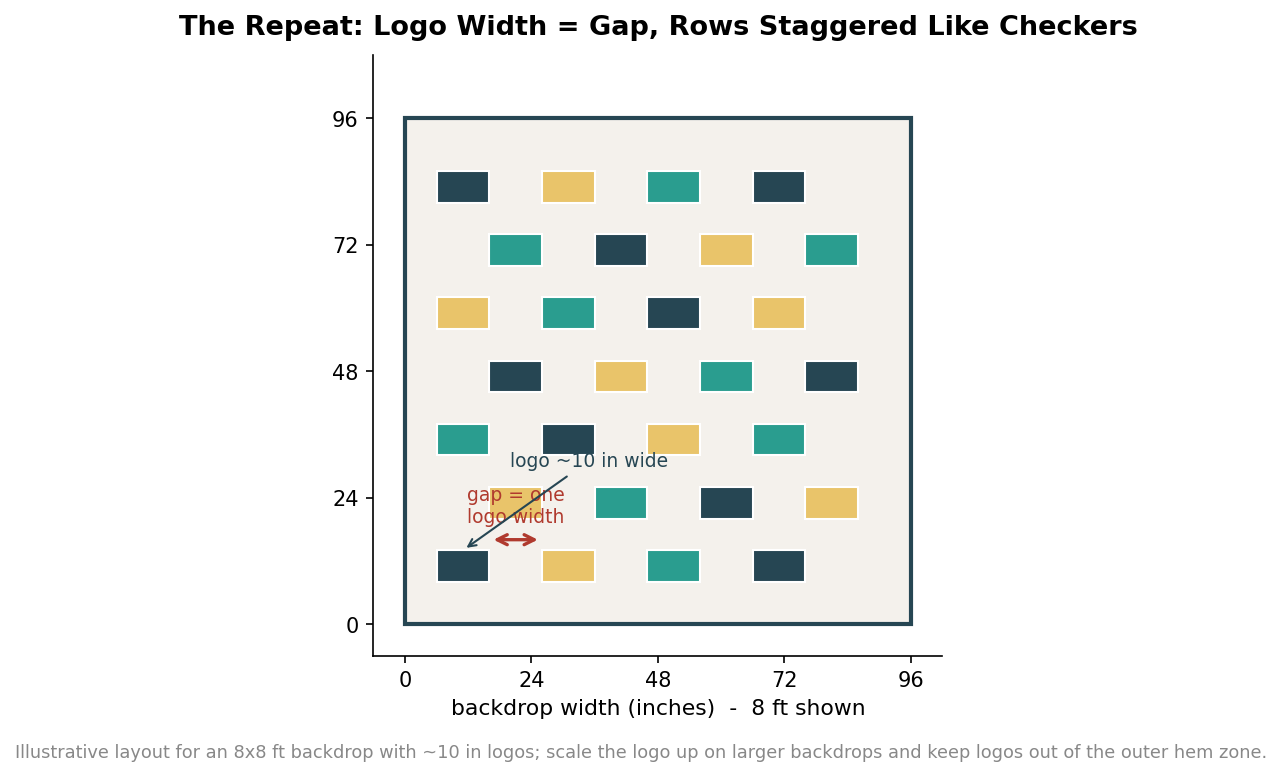
Start with how wide each logo should be, then let the banner size scale it. As a working range, individual logos on a step-and-repeat usually sit somewhere between 6 and 12 inches wide. On a standard 8-by-8-foot backdrop, 8 to 10 inches wide keeps the mark readable without crowding; on a 10-by-10-foot or larger wall, 10 to 12 inches holds the same visual weight across the bigger field. The instinct to make the logo bigger so people can see it usually backfires, because oversized logos mean fewer repetitions and a greater chance that a tight photo crop lands on blank space between them. Scale the logo proportionally to the banner rather than picking a size in isolation.
Space It Like Checkers
The spacing rule is simpler than it looks: leave about one logo’s width of gap between repetitions. If your logo is 8 inches wide, put roughly 8 inches of space before the next one, and use the same measure for the vertical gaps between rows. Then offset every other row by half a step so the logos fall in a staggered, checkers-style pattern rather than a rigid grid. The stagger matters for a practical reason: when a guest stands in front of the wall, their body blocks part of it, and a staggered pattern keeps whole logos visible on either side of them instead of leaving a column of half-hidden marks. Consistent gaps equal to the logo width keep the whole field balanced no matter where the camera crops.
Design for the Camera, Not the Wall
Judge the layout by what a phone camera sees from a few feet away, not by the full flat banner. A typical posed photo captures only a portion of the backdrop behind the subjects, so aim for at least two to three complete logos to be visible in that crop, from head height down to the waist. Keep the logos clear of the outer edge of the banner, because the hem, pole pockets or the frame’s border can swallow anything printed too close to the perimeter, and a face-level row of logos is worth more than one near the floor where it will be hidden by legs. Contrast counts too: a logo that is legible on screen at full size can vanish against a busy or low-contrast background once it is printed large and lit by a camera flash, so favor clean, high-contrast lockups. If you are alternating two brand marks, or a logo and an event hashtag, keep their visual weights similar so neither one disappears in the pattern.
Match the Backdrop Size to the Crowd
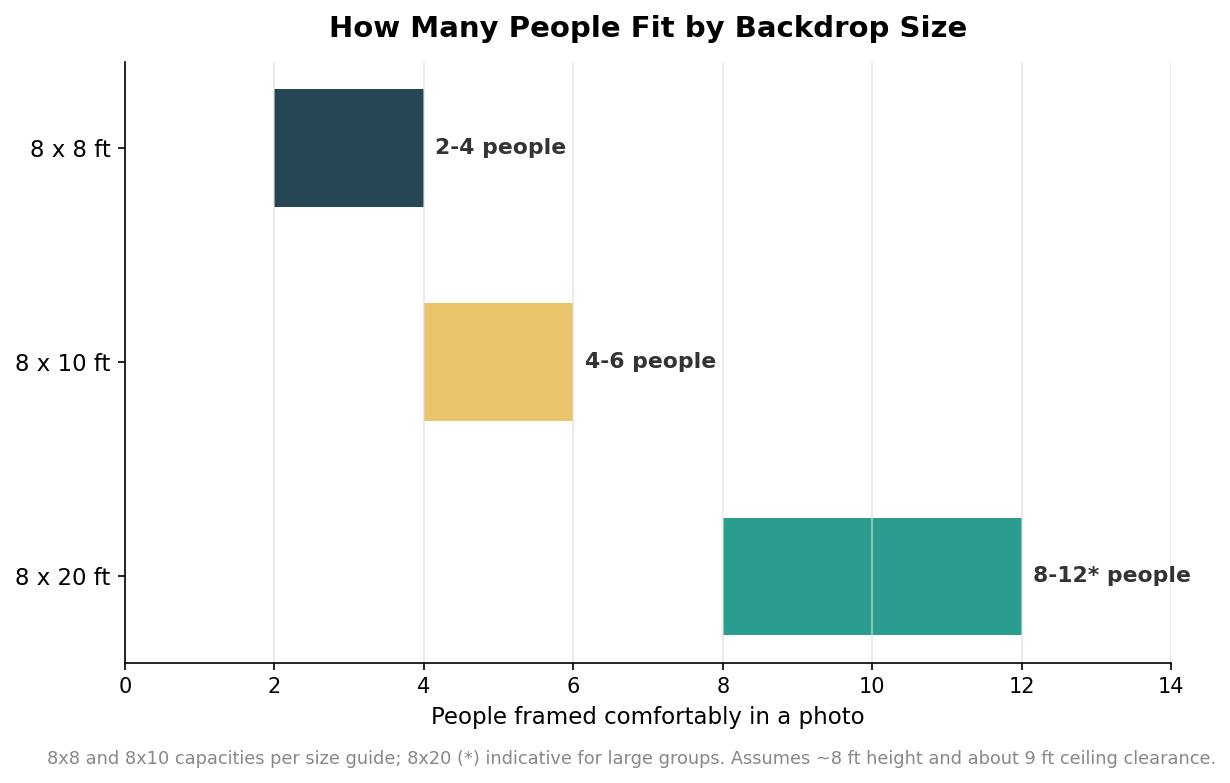
Choose the banner footprint for the group you expect in a single shot. An 8-by-8-foot backdrop frames individuals, couples and small groups of two to four people and fits comfortably in compact spaces like hotel ballrooms and retail floors. An 8-by-10-foot wall opens that up to roughly four to six people with room for more dramatic poses, and wider formats are used when you need to fit larger groups or run a true red-carpet line. Two logistics decide whether the size you want will actually work on site: ceiling height and stand footprint. Plan on at least about nine feet of ceiling clearance for a standard eight-foot backdrop, and remember the adjustable stand behind it typically spans seven to ten feet wide and needs floor space of roughly ten by ten or ten by twelve feet once the feet are out. Confirm the room before you confirm the size.
Build Print-Ready Artwork
The last step is handing the printer a file that survives being blown up to wall size. Supply the logo as vector art wherever possible, because vector marks stay crisp at any scale where a small raster logo would turn to mush. If you must use a raster image, build the artwork at the final dimensions and check that it holds up; large-format graphics are viewed from a distance, so they are commonly designed at reduced scale with the resolution set to still resolve cleanly at full size, but a tiny web logo stretched to ten inches will look ragged no matter what. Add the bleed and finishing allowance your printer specifies, keep all logos and any text inside a safe margin so nothing critical lands in the hem or grommet zone, and set the file up in the correct color space so your brand colors do not shift on the press. Then proof the full pattern at one hundred percent on screen, and ideally check a small physical sample, before committing the whole run. The goal is a file that needs no rescue on the print floor.
A backdrop that works is really just three good decisions stacked together: logos sized to the wall, spaced a logo-width apart in a staggered pattern, and delivered as clean, print-ready art with room to spare at the edges. Get the layout right and the size right for the crowd, and every photo taken in front of it does exactly what you built it to do, which is carry your brand into someone else’s feed looking sharp.
Leave a Reply